Apps
There is nothing to install and no store listing to link to. The site is the client — the same live markets, the same terminal, the same account, on a phone or on a desk.
The site is the client
Everything this product does happens in a browser tab. Prices stream, the chart draws, the ticket validates against the venue’s real rules, and the fill lands in the ledger — from the page you are on. There is no better version of this product waiting behind an install.
That is a decision rather than a shortage. A native build would not add a market, a millisecond or a feature. It would add a download in front of the same product, a review queue between a fix and you, and two versions of a money surface live at the same time.
Where you can use it
- Any modern browserPhone, tablet or desktopLive now
- Apple App StoreiOS and iPadOSNo listing
- Google PlayAndroidNo listing
Nothing on this page links to a store, because there is no listing on either to link to.
What a phone actually gets
The whole product, at phone width. Not a cut-down companion that shows balances and sends you to a desktop to trade — the markets board, both terminals, your Balance and your order history are all reachable from the device in your hand.
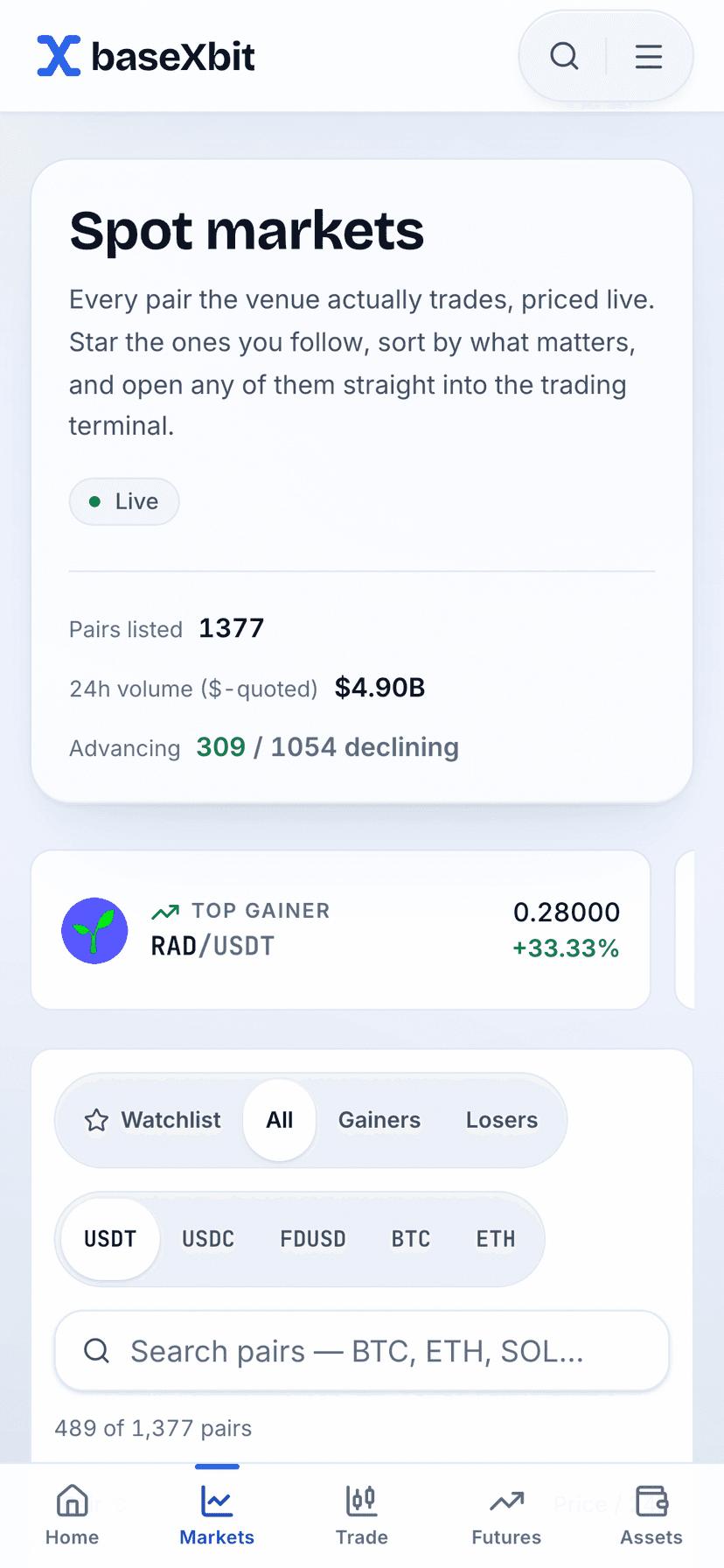
The whole catalog, counted
Pairs listed, dollar-quoted 24-hour volume and the advancing-against-declining split are computed over every pair the venue actually trades — the same list a desktop gets. The gainer, loser and most-traded cards under them are read off that list, not picked by hand.
The feed reports on itself
That Live badge is the stream’s own status. When the connection drops it says Reconnecting, and when it cannot recover it says Offline and tells you the prices are the last ones it saw — because a frozen number looks exactly like a stable one.
Five tabs, always in thumb reach
Home, Markets, Trade, Futures and Assets are pinned to the bottom edge on every page, padded clear of the home indicator, and they disappear at 1024px where the header takes navigation back.
Native apps: not released
Neither store has a binXbase listing. Not an unreleased one, not a pre-order, not a beta — no submission has ever been made to either. Below is what that means per platform and what would have to be true before it changed.
iOS and iPadOS
Apple App Store
No app has ever been submitted, so there is no listing, no pre-order and no TestFlight build. If a search under this name turns something up, it is not this product.
What would have to happen first
- A native client to submitNothing has been built. Every screen in this product is a React route rendered by the web app; there is no iOS project in this repository to compile, sign or ship.
- An Apple Developer Program accountSubmission needs an enrolled legal entity paying the annual membership. binXbase has not enrolled in the program, so there is no account to submit from.
- A review this project can passApp Review reads a trading app as a financial product. It is a real question whether this project belongs in that category at all, and answering it honestly comes before submitting anything.
Android
Google Play
No app has ever been published, so there is no listing, no open testing track and no internal build. No APK is distributed anywhere either, so there is nothing to sideload.
What would have to happen first
- A native client to packageThe same gap as iOS: there is no Android project here. A wrapper around this website would be a browser with our icon on it, which is worth less than the icon you can already make yourself below.
- A Play Console developer accountPublishing needs a registered account with a verified identity and address, which for a financial app is checked rather than taken on trust.
- A financial-features declaration that is truePlay asks trading apps to declare their category and, in many markets, to show a licence. The truthful declaration is that no money is at stake here, and that answer has to be worked out before it is filed, not after.
Why there are no store badges here
A store badge is a link to a listing. Both stores supply that artwork with wording that promises a download or a pre-order, and both promises would be false on this page. Drawing one greyed out would be worse: it asserts the app exists and is merely unavailable to you.
What happens if this changes
These two cards get deleted and replaced with real links to real listings. Until that day there is nothing here to tap, nothing to sign up for and no date being implied — the same rule the rest of the product follows about staking, native apps and every other feature that does not exist yet.
Use it like an app now
Both mobile browsers can put an icon for this site on your home screen, next to everything you did install. It takes about ten seconds, and it is the closest thing to an app that honestly exists today — so the last panel below spells out exactly what that icon is and what it is not.
iPhone and iPad — Safari
- Open the page you want the icon to land on. The markets board and any terminal both work — the icon remembers the exact page.
- Tap the Share button in the toolbar — the square with an arrow leaving it.
- Scroll the share sheet down and choose “Add to Home Screen”.
- Rename it if you like, then tap Add. Recent versions of iOS also show an “Open as Web App” switch here: leave it on and the icon opens without Safari’s chrome, turn it off and it opens as an ordinary tab.
Android — Chrome
- Open the page you want, the same way.
- Tap the menu at the top right of the browser.
- Choose “Add to Home screen”. Chrome words this differently across versions — you may see “Install app” instead — and either one gets you the icon.
- Drop it wherever you keep the apps you actually open.
What that icon is, and what it is not
What you get
- An icon among your apps that opens straight to the page you saved — the board, a terminal, your Balance.
- The live streams the moment it opens, and a price feed that reconnects itself after a drop, which is what a phone on a moving train needs.
- Nothing to update. It is the site, so it is whatever was deployed most recently, with no version of it stuck on your device.
- No permission sheet, because nothing in this product asks for a permission.
What you do not
- It is not a store install. This site ships no web app manifest, so the browser has no name, start URL or display mode from us — whether the icon opens with browser chrome or without it is your browser’s default, not our declaration.
- It does not work offline. There is no service worker, and that is deliberate as well as absent: a market screen that rendered without a network would be showing prices that stopped being true.
- It cannot notify you while it is closed. That needs a service worker and a push subscription, and neither exists here — it is the one thing on this page a native app would genuinely fix.
- Only iOS is handed an icon. This repository ships one 180 × 180 apple-touch-icon and no manifest, so Safari gets a mark we drew and every other launcher is left deriving one from the page.
Checked in this repository rather than assumed: there is no app/manifest.ts and no public/manifest.json, nothing registers a service worker anywhere in the web app, and the only two icons in the tree are src/app/icon.svg and the 180 × 180 src/app/apple-icon.tsx.
Built for the phone, not shrunk to it
The terminal is one set of components in one DOM order, arranged into two different grids. On a phone the ticket sits directly under the chart and the book and tape split the width below it; on a desktop the chart takes the left column with the book above the tape beside it and the ticket down the right. Nothing is hidden on the small layout — it is reordered, because the thing you act on should not be the thing you scroll past.
Below 1024px a five-tab bar — Home, Markets, Trade, Futures, Assets — is pinned in thumb reach on every page and padded clear of the home indicator. It is the app spine an installed app would have given you, and the site has it already.
What a native app would, and would not, add
An argument for the web is only worth reading if it concedes where the web loses. It loses in exactly one row of this table, and that row is named rather than buried.
| Capability | In a browser tab today | What a native app would change |
|---|---|---|
| Live prices | Up to three server-sent streams per tab — all tickers, this market, your account — each reconnecting on its own after a drop. | Nothing. The same venue feed over the same network. |
| The trading terminal | Chart, book, tape and ticket, laid out for a phone rather than scaled down. | Nothing you could not already do here. |
| Fills while you are away | A toast and a sound cue — only while a tab is open. | The one real gap: a notification when a resting order fills and nothing is open. |
| Signing in | An email and a password; the session is a cookie. | A face or a fingerprint. A passkey in the browser would do the same, and neither is built. |
| Held on your device | Three keys: your starred pairs, the recent-activity list, and whether the sound cue is on. No permission is ever requested. | Whatever the binary asks for on first launch, and whatever ships inside it that you cannot read. |
| Working offline | Nothing does, deliberately. | A cached shell showing a market that stopped updating. We would rather show nothing. |
| Getting a fix to you | The build you open is the build that was deployed. | A store review queue, and two versions of a money surface live at once. |
What this needs from your browser
Four web features, all of them a decade old or more, and no permission at all. If your browser can play a sound and draw on a canvas, it can run this exchange.
EventSource
Server-sent events
Every live number arrives on one of three streams: all tickers, one market’s book, tape and candle, and your own account. They are one-way and plain HTTP, so a browser reconnects them itself — this site hands back a three-second retry hint on every one, which is what makes a phone surviving a lift or a tunnel a non-event.
<canvas>
The chart surface
Candles, the volume histogram and your own fill markers are drawn onto a canvas rather than laid out as elements. It is the same renderer at 360px and at 2560px; the phone gets the whole chart, not a picture of one.
localStorage
Three small keys
Your starred pairs, the recent-activity list behind the bell, and whether the sound cue is on. That is the entire local footprint, it never leaves the device, and clearing it costs you three preferences and nothing else — balances and orders live in the ledger on the server.
AudioContext
Web Audio
The cue when an order fills is synthesised on the spot — two partials, under 400ms, roughly a tenth of full volume — rather than downloaded as an audio file. Nothing to fetch, nothing to decode on the first fill of a session, and it can be switched off.
It asks for no permission
Not notifications, not the camera or microphone, not your location, not your contacts, not anything in the background. There is no permission sheet on the way in, because nothing in this product has a use for one.
That is worth saying out loud on a page about apps: the prompts are the cost of an install, and this is the version with none of them.
The fastest way to test any of this is to open the terminal on the device you are holding. If the mechanics are new, the 8-lesson primer reads just as well on a phone, and how this works explains where every number on screen comes from.